
Book Dividends
Keep track of all dividend payments and record them in your portfolio with ease. Manually for individual positions — or use batch booking to handle everything at once.
Option 1: Manual Entry
- Open your portfolio
- Navigate to the "Costs & Income" tab
- Click "Add"
- Select the relevant portfolio position
- Choose "Dividend" as the type
- Enter the dividend amount per share
- Click "Add" — done
Manual entry works reliably, but becomes time-consuming if you hold many dividend-paying positions. For multiple dividends at once, use batch booking.
Option 2: Batch Booking
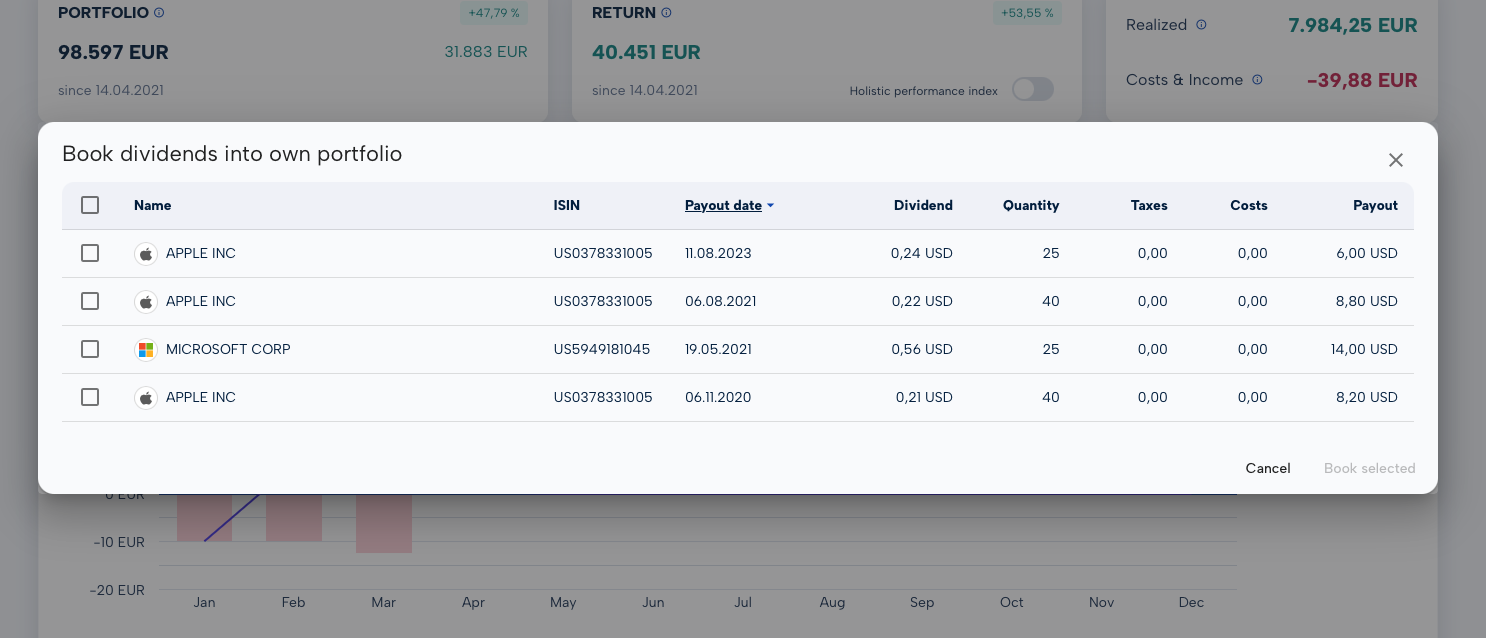
The smart way: click "Batch Book Dividends" — MoneyPeak automatically scans all your positions for dividend payments and shows you a consolidated list:
- Which stocks have paid dividends
- Amount per share
- Payment date
Select the dividends you want to book and click "Book" — all selected entries are recorded in a single step.
For dividend investors with regular payouts, batch booking is significantly more efficient than manual entry.
Why Booking Dividends Matters
No manual research
You don't have to look up every dividend payment individually.
Time savings
Batch booking instead of dozens of individual entries.
Fewer errors
Automated data prevents typos and missed entries.
Complete overview
No dividend slips through the cracks — every payout accounted for.